How to Register on the New RailOne App
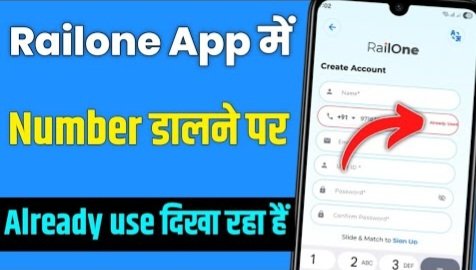
How to Register on the New RailOne App (IRCTC) — Complete Guide, Fix “Mobile Number Already Used” Error
Updated for 2025 | Step-by-Step Tutorial + Troubleshooting + FAQs
Introduction
Indian Railways and IRCTC have recently launched a brand-new app called RailOne, designed to simplify railway ticket booking, PNR status checking, seat availability, and other travel-related services.
However, many users are facing a common issue while signing up: when entering their mobile number during registration, the app displays a message — “This number is already registered” or “Mobile number already used”.
In this article, we’ll explain how to register successfully on the RailOne app, and provide a complete step-by-step guide to fix registration errors like “already registered mobile number.”
Why the RailOne App Is Important
RailOne is the latest official app from IRCTC that replaces or complements older versions like IRCTC Rail Connect. It provides:
✅ Faster ticket booking process
✅ Real-time train tracking
✅ Easy refund management
✅ Digital wallet integration
✅ User-friendly interface
So, having a working account on the RailOne app is essential for smooth ticket booking.
Step-by-Step Guide: How to Register on RailOne App
Follow these exact steps carefully to create your RailOne account without errors 👇
Step 1: Install the Official RailOne App
-
Go to Google Play Store or Apple App Store.
-
Search for “RailOne – IRCTC Official App”.
-
Verify that the developer is IRCTC (Indian Railway Catering and Tourism Corporation).
-
Tap Install.
Step 2: Open the App
After installation, open the app and select “New User? Register” from the login screen.
Step 3: Enter Your Mobile Number
-
Type your 10-digit mobile number (preferably the number linked to your Aadhaar or UPI).
-
Tap Next / Continue.
Step 4: Fill Personal Details
Provide accurate information:
-
Full Name (as per ID proof)
-
Date of Birth
-
Gender
-
Email ID
-
Nationality
Step 5: Create Username & Password
Choose a unique username and a strong password (at least 8 characters, with one number and one special symbol).
Step 6: Add Address
Enter your:
-
State
-
City / Town
-
Pincode
-
Address
Step 7: Verify Mobile Number
You will receive an OTP (One Time Password) on your registered mobile number.
Enter it to verify.
Step 8: Accept Terms & Submit
Tick the Terms and Conditions box and press Submit / Register.
If all details are valid, your RailOne account will be created successfully.
Problem: “Mobile Number Already Used” Error
If you see this message during registration, it means your mobile number is already linked with an existing IRCTC or RailOne account.
Common Causes
-
You have used this number earlier on the IRCTC Rail Connect app.
-
The number is linked to an incomplete or pending registration.
-
Someone else used your number by mistake.
-
A temporary system error from IRCTC’s database.
How to Fix “Mobile Number Already Used” Error (Step-by-Step)
1. Try Logging In
Go back to the login page → choose Forgot Password / Forgot User ID → enter your mobile number.
If the system recognizes it, it will send OTP for password reset.
✅ This means your number already has an account — just recover it instead of registering again.
2. Clear App Cache or Reinstall
Sometimes the RailOne app stores old data.
Follow these steps:
-
Go to Settings → Apps → RailOne → Storage → Clear Cache / Clear Data.
-
Reopen the app and try registering again.
3. Don’t Use VPN or Public Wi-Fi
Avoid using VPN, proxy, or public Wi-Fi during registration.
Use mobile data or a trusted home network for better connectivity.
4. Try Another Number (Temporary Fix)
If you urgently need to book tickets and can’t wait, register using another valid number.
Later, update your original number in your RailOne account profile.
5. Contact IRCTC / RailOne Support
If none of the above steps work, contact official support.
Use this ready-to-send message 👇
Support Message Template
Send this through the in-app Help section or IRCTC support email (care@irctc.co.in).
Tips to Avoid Future Registration Errors
✅ Always register with your own mobile number and email ID.
✅ Keep your username and password saved in a secure place.
✅ Don’t attempt registration multiple times in a row — wait a few minutes.
✅ Keep your app updated from Play Store.
✅ If you change your number, update it immediately in your profile.
Conclusion (Nishkarsh)
The new RailOne App by IRCTC offers an improved and modern experience for train passengers — but during the first-time registration, users may see the “mobile number already used” issue.
The best fix is to recover your existing account through the “Forgot Password” option.
If that fails, clear the app cache, avoid VPN, or contact IRCTC support to release the number.
By following the above guide carefully, you’ll be able to register and start using the RailOne app for ticket booking, PNR checking, and other railway services within minutes.
FAQ (Frequently Asked Questions)
Q1. What is RailOne App?
RailOne is the latest IRCTC official app for Indian Railway passengers, designed for easier and faster ticket booking with an improved interface.
Q2. Why does it show “mobile number already used”?
It means your number is already linked to an older IRCTC or RailOne account.
Q3. Can I use the same mobile number for a new account?
Only if IRCTC deletes or unlinks it from the older account — you’ll need to contact support for that.
Q4. What if I forgot my RailOne username or password?
Use the “Forgot Password” or “Forgot User ID” option — enter your mobile number and follow the OTP verification steps.
Q5. How to contact RailOne / IRCTC support?
You can contact via email at care@irctc.co.in or use the Help / Support section in the app.
Q6. Is RailOne safe to use?
Yes, RailOne is the official app by IRCTC and completely safe for transactions and ticket bookings.
 Help
Help
Email na aata Hai mobile forget ho gaita Hai